Today’s giveaway is Quicksys RegCleaner 2009, another program which aims to help you clear your registry of invalid entries and other junk.
Installation
Install and run the program, then enter the name and registration number provided.
Ease of Use
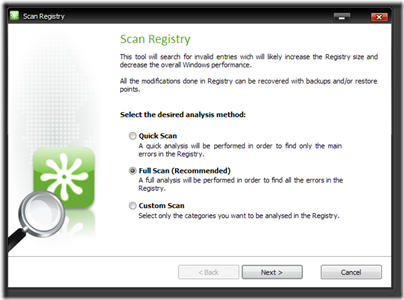
Scanning of errors was done with minimum fuss. As with other similar programs however, deleting of registry entries should be done only if you know what you’re doing. Many of the errors reported were related to deleted files and uninstalled programs, so I deleted them without much hesitation. Those who are afraid of deleting something critical would appreciate the “Quick Scan” option, which clears mainly history lists and is a lot safer based on the errors it reports.
Features

Quicksys RegCleaner 2009 did a thorough sweep of my registry, finding more than 2000 invalid entries. TuneUp Utilities’ and Glary Utilities’ Registry Cleaners found a third of that, though absolute numbers are in no way an accurate measure of a program’s ability to find errors – what’s important is that no “false-positives” are reported.

On this aspect, Quicksys RegCleaner 2009 reported many registry keys with missing or invalid paths. As I’m no expert myself, I wasn’t too comfortable deleting some of the keys which with meaningless names, especially those under HKEY_CLASSES_ROOT. Quicksys RegCleaner did report many invalid references created by Stardock Fences to deleted/ moved desktop files, that were missed by both TuneUp Utilities and Glary Utilities.
The window listing all the errors found could do with some improvements. You can’t sort the entries listed, and there is no “invert selection” option. Missing is an option to exclude certain errors from future scans. You need to manually add paths to ignore under the program’s settings. The program does allow you to jump quickly to the selected entries and quickly check/ uncheck large groups of entries via the right click menu.
The scanning process was quick, and the program allows you to tweak how many threads to use to further speed up the process. On the default settings, a full scan took around 40s, comparable to the other two registry cleaners mentioned above.
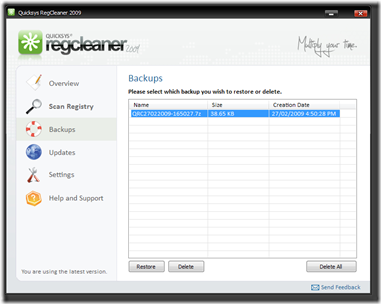
The program creates backups of the changes it makes, and restoring them was a quick and straightforward process.
Summary
To sum things up, Quicksys RegCleaner 2009 does a good job of scanning your registry for errors. The “Quick Scan” option finds entries that are safe to delete, and I would recommend you choose this over the complete scan. I’m divided over the purpose of registry cleaners, but if you are the type of person who likes things spick and span, I would recommend you get today’s offer.
Rating: 3.5/ 5
Givewayoftheday.com
Free Alternatives
CCleaner – Fast scanning process, deletes browser/ program histories also.
Glary Utilities – A complete utility suite that also contains a disk cleaner, shortcut fixer and duplicate files finder. Highly recommended.

TuneUp Utilities 2007 – I reviewed it previously, also another highly recommended set of tools. This is the free version available, the program is actually now into version 2009.
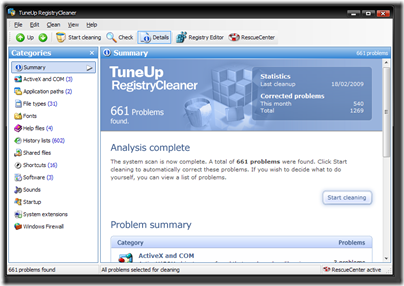
Argente Registry Cleaner – Specialises in cleaning your registry. Has 3 levels of scanning, and an option to add entries to exclusion lists.

Comodo System Cleaner


