Showing posts with label Freeware. Show all posts

Monday, March 2, 2009

1-Minute Roundup – 2nd March 2009

Today, I take a look at 3 freebies – a note-taking program, a tool to monitor changes to your system, and a useful windows manager.

CintaNotes


image

A new beta of this lightweight note-taking program has just been released early this month. Changes include an silent clipping option, xml import, as well as more powerful options to manage tags.

CintaNotes sits in the tray, until you select some text and press a configurable hotkey to add the selected text as a note. It remembers the website you copied the text from, and you can use the "Browse Link" option to jump to the original source.  Browsers supported include Internet Explorer, Firefox, Opera, Chrome, and Safari 4. Website/ window titles are automatically added, and you can assign tags to notes.

The search function worked well, you can start typing in the window to filter notes.

CintaNotes does not aim to compete with the likes of Evernote, the developers want to keep it light and uncluttered. Having tested previous betas, I’m quite impressed with the progress this program is making.

Cintanotes.com

SpyMe Tools


image

SpyMe Tools is a system monitor that tracks changes made to your system. Perhaps you would like to know what registry key that “system tweak” is actually editing. It offers a registry and a file/ folder mode, and also includes a real-time registry monitor.

image

Scanning times are quite fast, though not as fast as Regshot, another free program that helps you find changes made to your system.

Spymetools (via ghacks.net)

Pitaschio


image

Pitaschio is a small program whose interface you won’t need to see often. In fact, I have it running in the background with not even its tray icon displayed. Pitaschio  allows you to manage your windows using your mouse, such as minimising them to tray by right-clicking the minimise button, changing their transparency by scrolling your mouse over the title bar, making them appear on top of other windows or rolling them up to leave only the title bar. You can assign different key+mouse combinations to certain actions.

image

Extras include a smart rename option for Windows XP users that mimics Vista’s renaming behaviour (only the filename part is selected when you press F2), and keyboard/ mouse disablers – handy when you need to clean your keyboard or mouse halfway through work. You can also set the Windows desktop to use small icons, similar to Explorer’s list view.

Pitaschio

Continue Reading...

Friday, January 23, 2009

LeaderTask 6.1


Today's free program from Giveaway of the Day is LeaderTask 6.1, an organiser which focuses on helping you manage tasks and events of projects. The user rating was at 33% when I last checked, soI decided to find out if this program should be recommended.

The program description says it will help you "complete more, get tired less, earn more" and "permanently improve the quality of life..." While I'm not too sure how large an impact on your life this program can be, the software itself runs with no major issues. Please note that you have to run the included activation file inside the zip file after installing the software. If it still shows as unregistered, restart LeaderTask by right clicking its icon in the system tray and exiting it completely.

The large main pane on the right will be what you'll be working with most of the time, while the left pane lets you switch between views and projects. LeaderTask seems to be a project-oriented organizer - you get the usual tools to create tasks, notes (with support for multi-level, collapsible to-dos and notes) and schedule events. You can create filters, categories and links to further manage/ view your information in different ways. A small toolbar toggles between the filters in effect, and clicking on a small (too small in fact, in my opinion) magnifying glass lets you perform a search.

I would say that the interface will take some time getting use to. But once you grasp the concept of projects and categories, adding and editing tasks and notes is quite straightforward. LeaderTask allows you to set reminders for upcoming events, and supports scheduling of recurring events. The calendar colour-codes events based on their priority. I wasn't able to find an option that allows me to highlight them based on the colours assigned to their categories.


To sum up, LeaderTask performs its job reasonably well, and considering its price for today, may just be what you need. Better search options and more control over the way calendar items are displayed would be good, but it definitely deserves a rating better than 33%.

Free download from Givewayoftheday.com

More info on leadertask.com

Also take a look at Chandler, EssentialPIM, Total Organizer, MSD Organizer and TimeTo

Continue Reading...

Wednesday, January 21, 2009

QtWeb - Webkit-based browser


The QtWeb browser is based on WebKit, the open source web browser engine that powers Safari and Chrome. The portable edition, at a little over 4mb, ran quickly, albeit some problems with input boxes. 

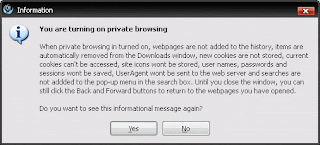
Features include a private browsing mode and bookmark import from major browsers (Internet Explorer, Firefox, Opera supported)

The zoom feature could be improved on though, as it scales only the text. The download manager also doesn't support resume yet.

Download

Continue Reading...

Sunday, January 18, 2009

VideoPad Video Editor


A free alternative to Windows Movie Maker, this program from NCH Software (Check out WavePad from the same company also) offers a simple way to combine video clips, add sounds, effects and transitions, and export the result to other formats.

Don't expect fancy video effects though, they are restriced to contrast, brightness, gamma adjustments, and black/white or sepia effects.

Format support is good. Avi, mp4, wmv, mov are just some of the formats supported. It also allows you to export the video to your iPod, PSP, or Pocket PC.

For Windows 2000/XP/2003/Vista

Download

Continue Reading...

Friday, January 16, 2009

CintaNotes Beta M5


This free, lightweight note-taking tool sits in your system tray and captures any selected text when you press the configurable hotkey.

It even remembers the website you copied the text from - just right click on a note and select the "Browse Link" option. Browsers supported include Internet Explorer, Firefox, Opera and Chrome.

Find-as-you-type helps you filter your notes quickly, by time, text or tags.

Grab the beta from cintanotes.com

Continue Reading...